
Background Vectors by Vecteezy
You can increase the amount of ram Anypoint Studio uses by doing the following:
Go to where you Anypoint Studio is located find the file called “AnypointStudio.ini” see below

Open the file on your favorite text editor and look for these two lines.
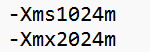
The -Xms1024m line is the minimum amount of memory Anypoint Studio can use and its in megabytes. In this examples the minimum that can be used is 1GB. The Xmx2024m is the maximum amount of memory that can be used. In this example its 2GB.
So say you want to have Anypoint Studio use minimum 4GB and maximum to 8G, then you would set following lines to -Xms4024m and -Xmx8024.
Hope that helps!
Mulesoft Rocks!!